

Power Tools
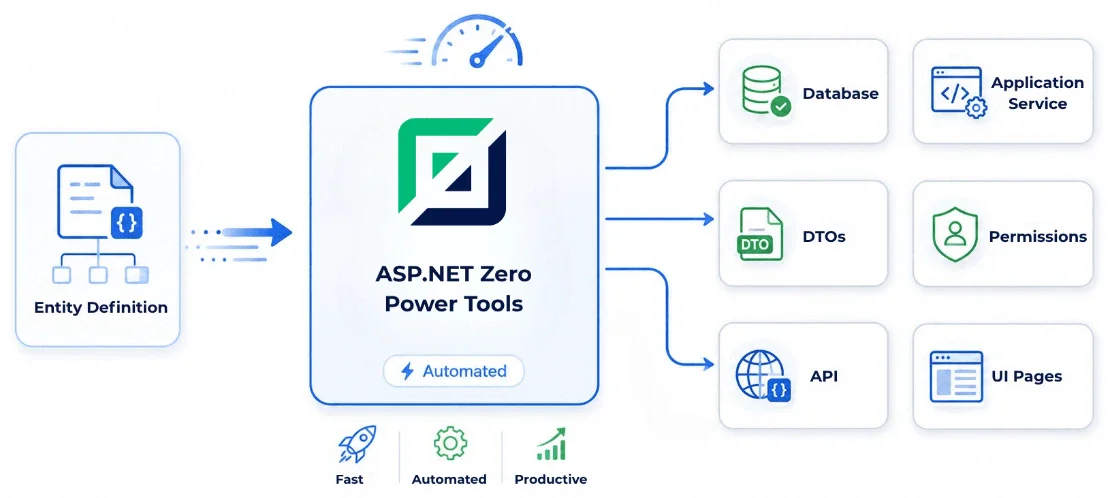
Generate complete ASP.NET Zero features in minutes, from domain layer to UI: repetitive scaffolding produced instantly and consistently, without spending AI credits on it.
Watch Power Tools in Action
See how ASP.NET Zero Power Tools generates working full-stack code in a few steps.
- Pick a layout
- Start the entity wizard and choose a page template: DataTable, card view or master-detail.
- Define the entity
- Add properties (strings, numbers, dates, GUIDs, enums) and set validation and UI behaviour for each one.
- Wire up relationships
- Navigation properties become foreign keys, lookup dialogs, dropdowns and typeahead controls.
- Generate
- Server and client code, tests, permissions, localization and EF migrations, written straight into your solution.
Code Generation for Real Projects
ASP.NET Zero Power Tools is a cross-platform command-line tool that generates production-ready code for common application tasks. It helps you deliver faster while keeping the architecture clean and consistent.
- From Domain to UI
- Generate entity, application service, DTO, mapping, migration and UI code in a single workflow.
- Production-Ready Defaults
- Power Tools follows ASP.NET Zero conventions and creates working code you can run and extend immediately.
- Faster Than Repeating Prompts
- For basic and repetitive tasks, you don't need to spend AI credits. Power Tools handles boilerplate instantly and reliably.

What Power Tools Generates
Power Tools automates repetitive scaffolding while preserving maintainable, layered architecture.
- Domain & Application Layers
- Entities, DTOs, application services, authorization checks, migration support and localization updates.
- Full Stack UI Output
- Generate Angular, React, MVC and MAUI-compatible pages and related client-side structures.
- Tests Included
- Create unit tests and UI tests for generated CRUD flows to keep quality high from the first commit.
-
 Angular
-
 React
React
-
 MVC & jQuery
Advanced Scenarios, Still Simple
Beyond basic CRUD, Power Tools supports master-detail pages, loading entities from database and template customization.
- Master-Detail Tables
- Create parent-child pages with one-to-many relationships and generated navigation properties.
- Load Entity From Database
- Import existing tables and generate code quickly for SQL Server, PostgreSQL, MySQL and Oracle workflows.
- Template Customization
- Edit or extend templates to fit your coding standards and project-specific requirements.

Start with Power Tools.
Use Power Tools for standard generation tasks, and reserve your AI tokens for business-specific logic and unique product decisions.