---
title: "Using Telerik ASP.NET Core with ASP.NET Zero"
description: "ASP.NET Zero is the base solution for building robust and scalable web applications. Unlock your full potential today!"
url: "https://aspnetzero.com/blog/using-telerik-asp.net-core-with-asp.net-zero"
image: "https://aspnetzero.com/Images/Blog/using-telerik-asp.net-core-with-asp.net-zero.png"
---

[Blog](https://aspnetzero.com/blog)

# Using Telerik ASP.NET Core with ASP.NET Zero

20 December 2022 7 min read [MVC](https://aspnetzero.com/blog/topics/mvc) [Telerik](https://aspnetzero.com/blog/topics/telerik)

![Using Telerik ASP.NET Core with ASP.NET Zero](https://aspnetzero.com/Images/Blog/using-telerik-asp.net-core-with-asp.net-zero.png)

Share [X](https://twitter.com/intent/tweet?url=https%3A%2F%2Faspnetzero.com%2Fblog%2Fusing-telerik-asp.net-core-with-asp.net-zero&text=Using+Telerik+ASP.NET+Core+with+ASP.NET+Zero) [LinkedIn](https://www.linkedin.com/sharing/share-offsite/?url=https%3A%2F%2Faspnetzero.com%2Fblog%2Fusing-telerik-asp.net-core-with-asp.net-zero) [Reddit](https://reddit.com/submit?url=https%3A%2F%2Faspnetzero.com%2Fblog%2Fusing-telerik-asp.net-core-with-asp.net-zero&title=Using+Telerik+ASP.NET+Core+with+ASP.NET+Zero) [Hacker News](https://news.ycombinator.com/submitlink?u=https%3A%2F%2Faspnetzero.com%2Fblog%2Fusing-telerik-asp.net-core-with-asp.net-zero&t=Using+Telerik+ASP.NET+Core+with+ASP.NET+Zero)

# Using Asp.Net Zero with Telerik UI

Hi, in this article we will see how we can integrate the **Telerik UI** for ASP.NET Core (Kendo) components with our **Asp.Net Zero** MVC app. We will create a product crud app with the [Telerik UI grid component](https://www.telerik.com/aspnet-core-ui/grid).

Let's create a solution named **TelerikUIDemo** as described in [Getting Started](https://docs.aspnetzero.com/en/aspnet-core-mvc/latest/Getting-Started-Core) document. Using this project name guarantees that the namespace from the code snippets in this tutorial will match your project.

Follow the steps in the [Getting Started](https://docs.aspnetzero.com/en/aspnet-core-mvc/latest/Getting-Started-Core) document and run your application. If you have successfully completed all the steps, you will get a view as below:

![Asp.Net Zero Dashboard](https://aspnetzero.com/Images/Blog/dashboardV3.png)

## Telerik UI Integration with Asp.Net Zero

### Adding the Telerik NuGet Feed

The easiest way to add the Telerik NuGet feed to Visual Studio if you have purchased a commercial license is to use the Progress Control Panel:

- Download the Progress Control Panel from the **Overview** page of your [Telerik account](https://www.telerik.com/account).

- Run the Progress Control Panel.

- On the Login screen, check the **set up Telerik NuGet package source option**.

- If you miss to set up the NuGet feed on login, go to the Progress Control Panel options and scroll to **NUGET SETTINGS**. Enter your Telerik credentials and click the **Save and Close** button.

> You can find the more installation details from [here](https://docs.telerik.com/aspnet-core/getting-started/first-steps).

### Adding Telerik UI to your Asp.Net Zero Project

- Open the NuGet Package Manager.

- Select the Browse tab and search for **Telerik.UI.for.AspNet.Core**.

- Select the project and install. As a result, a line similar to `<PackageReference Include="Telerik.UI.for.AspNet.Core" Version="2022.2.621" />` is added to your **.csproj** file.

### Adding a Reference to Kendo.Mvc.UI on your Asp.Net Zero Project

- Add the following line to your **Startup.cs** file in **Startup** folder:

```csharp
public void ConfigureServices(IServiceCollection services)
{
    // ...other services

    // Add the Kendo UI services to the services container.
    services.AddKendo();
}
```

- Import the `Kendo.Mvc.UI` namespace in `~/Areas/App/Views/_ViewImports.cshtml` through `@using Kendo.Mvc.UI`. If you intend to use the Telerik UI ASP.NET Core Tag Helpers, add them with `@addTagHelper *, Kendo.Mvc`.

```razor
@using Abp.Localization
@inherits TelerikUIDemo.Web.Views.TelerikUIDemoRazorPage<TModel>
@addTagHelper *, Microsoft.AspNetCore.Mvc.TagHelpers
@addTagHelper *, TelerikUIDemo.Web.Mvc
@addTagHelper *, Kendo.Mvc
@using Kendo.Mvc.UI
```

### Including the Telerik UI for ASP.NET Zero Client-Side Resources

Add the following code at the end of **head** tag in `~/Areas/App/Views/Layout/_Layout.cshtml` file:

```html
<link href="https://kendo.cdn.telerik.com/2022.2.621/styles/kendo.bootstrap-main.min.css" rel="stylesheet" type="text/css" />

<!-- Add the the jQuery script from the Telerik CDN: -->
<script src="https://kendo.cdn.telerik.com/2022.2.621/js/jquery.min.js"></script>

<!-- Add the Kendo UI scripts: -->
<script src="https://kendo.cdn.telerik.com/2022.2.621/js/kendo.all.min.js"></script>
<script src="https://kendo.cdn.telerik.com/2022.2.621/js/kendo.aspnetmvc.min.js"></script>

</head>
```

To avoid conflicting jQuery files, remove jQuery from `app-layout-libs.min.js` at `bundles.json` as below:

```json
{
      "output": "view-resources/Areas/App/Views/_Bundles/app-layout-libs.min.js",
      "input": [
        "node_modules/json2/lib/JSON2/static/json2.js",
        "node_modules/jquery-validation/dist/jquery.validate.js",
        .
        .
        .
      ]
}
```

> If your widgets are unavailable or undefined, make sure jQuery is not defined more than once. You can find the more details from [here](https://docs.telerik.com/aspnet-mvc/troubleshoot/troubleshooting#widgets-are-unavailable-or-undefined).

### Running Asp.Net Zero with Telerik UI

- Add a simple controller.

- Create a view with [Telerik UI Date Picker Component](https://www.telerik.com/aspnet-core-ui/date-and-time-pickers) as below:

```csharp
<div class="row m-0 justify-content-center">
    <div class="col-md-6">
        <h2>Telerik UI DatePicker for ASP.NET Core</h2>
        @(Html.Kendo().DatePicker()
            .Name("my-picker")
            )
    </div>
</div>
```

- If you have successfully completed all the steps, you will get a view as below:

![Telerik UI Date Picker](https://aspnetzero.com/Images/Blog/telerik-ui-installation.png)

## Simple CRUD with Asp.Net Zero using Telerik UI

In this part we will create a simple CRUD application with Asp.Net Zero using Telerik UI. We will use the [grid component](https://demos.telerik.com/aspnet-core/grid) provided by TelerikUI. You can visit the website for more [TelerikUI Asp.Net Core components](https://demos.telerik.com/aspnet-core/).

Before starting the Asp.Net Zero and Telerik UI Crud part, if you do not have experience with Asp.Net Zero, I recommend starting with a more detailed [tutorial](https://docs.aspnetzero.com/en/aspnet-core-mvc/latest/Developing-Step-By-Step-Core-Introduction).

### Creating Product Entity

We define entities at domain specific folders in `.Core` (domain) project. We can create a folder named `TelerikUI` and define a `Product` entity as shown below:

```csharp
public class Product : FullAuditedEntity
{
    [Required]
    [MaxLength(ProductConsts.MaxNameLength)]
    public string Name { get; set; }
    
    public int UnitsInStock  { get; set; }
    public bool Discontinued { get; set; }
    
    [Required]
    [Range(ProductConsts.MinUnitPrice, MaxValue)]
    public decimal UnitPrice { get; set; }
}
```

We created `PersonConsts` in `.Core.Shared` project for `MaxLength` properties. This is a good practice since we will use same values later.

```csharp
public class ProductConsts
{
    public const int MaxNameLength = 64;
    public const int MinUnitPrice = 10;
}
```

We add a `DbSet` property for `Product` entity to `TelerikUIDemoDbContext` class defined in `.EntityFrameworkCore` project. Then `add migration` and **update the database**. If you're having trouble doing this, you can have a look [here](https://docs.aspnetzero.com/en/aspnet-core-mvc/latest/Developing-Step-By-Step-Core-Database-Migrations-Person).

```csharp
public class TelerikUIDemoDbContext : AbpZeroDbContext<Tenant, Role, User, TelerikUIDemoDbContext>
{
    public DbSet<Product> Products { get; set; }

    //...other entities

    public TelerikUIDemoDbContext()
        : base("Default")
    {

    }

    //...other codes
}
```

### Creating ProductAppService

```csharp
public interface IProductAppService : IApplicationService
{
    Task<ListResultDto<ProductListDto>> GetAll();
    Task InsertProduct(InsertProductInput input);
    Task EditProduct(EditProductInput input);
    Task DeleteProduct(EntityDto input);
}
```

DTO's are used to transfer data between **Application Layer** and **Presentation Layer**. We suggest using DTO's to transfer data between layers.

```csharp
public class ProductListDto : FullAuditedEntityDto
{
    public string Name { get; set; }
    public int UnitsInStock { get; set; }
    public bool Discontinued { get; set; }
    public decimal UnitPrice { get; set; }
}
```

```csharp
public class InsertProductInput
{
    public string Name { get; set; }
    public int UnitsInStock { get; set; }
    public decimal UnitPrice { get; set; }
}
```

```csharp
public class EditProductInput
{
    public int Id { get; set; }
    public string Name { get; set; }
    public int UnitsInStock { get; set; }
    public bool Discontinued { get; set; }
    public decimal UnitPrice { get; set; }
}
```

```csharp
public class ProductAppService : TelerikUIDemoAppServiceBase, IProductAppService
{
    private readonly IRepository<Product> _productRepository;

    public ProductAppService(IRepository<Product> productRepository)
    {
        _productRepository = productRepository;
    }
    
    public async Task<ListResultDto<ProductListDto>> GetAll()
    {
        var result = await _productRepository.GetAll().ToListAsync();

        return new ListResultDto<ProductListDto>(ObjectMapper.Map<List<ProductListDto>>(result));
    }

    public async Task InsertProduct(InsertProductInput input)
    {
        var product = ObjectMapper.Map<Product>(input);
        await _productRepository.InsertAsync(product);
    }

    public async Task EditProduct(EditProductInput input)
    {
        var product = await _productRepository.GetAsync(input.Id);

        if (product is null)
        {
            throw new UserFriendlyException("Product not found");
        }
        
        ObjectMapper.Map(input, product);
    }

    public async Task DeleteProduct(EntityDto input)
    {
        var product = await _productRepository.GetAsync(input.Id);

        if (product is null)
        {
            throw new UserFriendlyException("Product not found");
        }
        
        await _productRepository.DeleteAsync(input.Id);
    }
}
```

We are adding the following mappings to `CustomDtoMapper.cs` in `.Application` project:

```csharp
configuration.CreateMap<Product, ProductListDto>();
configuration.CreateMap<InsertProductInput, Product>();
configuration.CreateMap<EditProductInput, Product>();
```

### Creating ProductController

```csharp
[Area("App")]
public class ProductController : TelerikUIDemoControllerBase
{
    private readonly IProductAppService _productAppService;

    public ProductController(IProductAppService productAppService)
    {
        _productAppService = productAppService;
    }
    
    public async Task<ActionResult> Index()
    {
        var model = await _productAppService.GetAll();
        return View(model.Items);
    }

    [HttpPost]
    public async Task Insert(InsertProductInput insertProductInput)
    {
        await _productAppService.InsertProduct(insertProductInput);
    }
    
    [HttpPut("{id}")]
    public async Task Edit(EditProductInput editProductInput)
    {
        await _productAppService.EditProduct(editProductInput);
    }
    
    [HttpDelete("{id}")]
    public async Task<IActionResult> Delete(int id)
    {
        await _productAppService.DeleteProduct(new EntityDto { Id = id });
        
        return new StatusCodeResult(200);
    }
}
```

### Creating Index.cshtml

```html
@using TelerikUIDemo.Web.Areas.App.Startup

@model IEnumerable<TelerikUIDemo.TelerikUI.Dto.ProductListDto>

@{
    ViewBag.CurrentPageName = AppPageNames.Common.PhoneBook;
}

<div class="content d-flex flex-column flex-column-fluid" id="kt_content">

    <abp-page-subheader title="@L("Editions")" description="@L("EditionsHeaderInfo")">
        Hello
    </abp-page-subheader>

    <div class="@(await GetContainerClass()) w-75 py-3">
        @(Html.Kendo().Grid(Model)
            .Name("Grid")
            .Columns(columns =>
            {
                columns.Bound(p => p.Name);
                columns.Bound(p => p.UnitPrice).Width(140);
                columns.Bound(p => p.UnitsInStock).Width(140);
                columns.Bound(p => p.Discontinued).Width(100);
                columns.Command(command => command.Destroy()).Width(150);
            })
            .ToolBar(toolbar =>
            {
                toolbar.Create();
                toolbar.Save();
            })
            .Editable(editable => editable.Mode(GridEditMode.InCell))
            .Scrollable()
            .DataSource(dataSource =>
                dataSource
                    .WebApi()
                    .Model(model => { model.Id(p => p.Id); })
                    .Events(events => events.Error("error_handler"))
                    .Read(read => read.Action("Index", "Product"))
                    .Create(create => create.Action("Insert", "Product"))
                    .Update(update => update.Action("Edit", "Product", new { id = "{0}" }))
                    .Destroy(destroy => destroy.Action("DELETE", "Product", new { id = "{0}" }))
            )
            )
</div>

<script>
	
function error_handler(e) {
    var errors = $.parseJSON(e.xhr.responseText);

    if (errors) {
        alert("Errors:\n" + errors.join("\n"));
    }
}
</script>
</div>
```

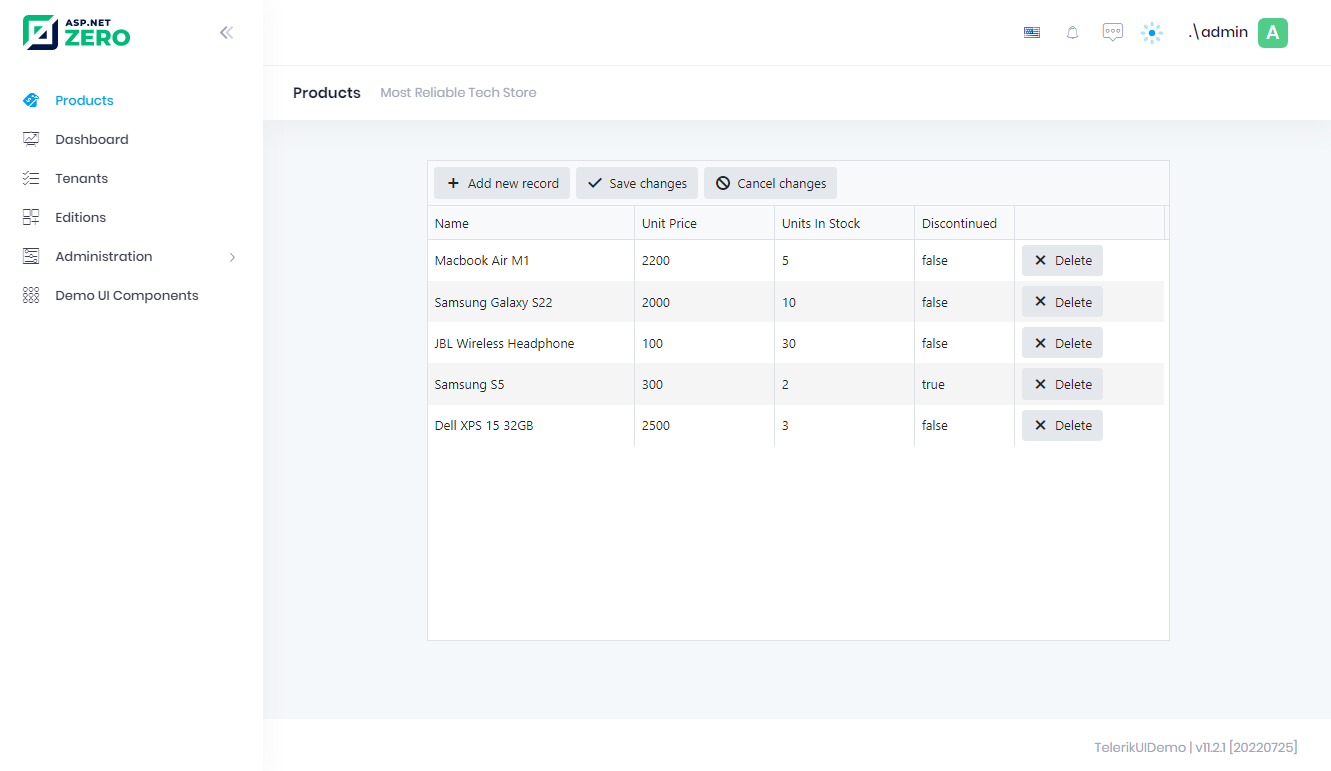
The final result of CRUD with Asp.Net Zero using Telerik UI is the following:

![Sample Crud with Asp.Net Zero Using Telerik UI](https://aspnetzero.com/Images/Blog/telerik-ui-final-result.png)

## See the full documentation

Explore detailed guides, API references, and step-by-step tutorials for ASP.NET Zero.

[Browse documentation](https://aspnetzero.com/documents)

## Have questions before purchasing?

Schedule a free consultation with our team to find the right plan for your project.

[Schedule a meeting](https://aspnetzero.com/schedule-meeting)

## You might also like

### [Business Benefits of Using ASP.NET Zero for Enterprise Software Development](https://aspnetzero.com/blog/business-benefits-of-aspnetzero)

11 September 2026

### [Common Mistakes and Errors When Hosting ASP.NET Core Apps](https://aspnetzero.com/blog/common-mistakes-and-errors-hosting-aspnet-core-apps)

26 August 2026

### [Using AutoMapper After Migrating to Mapperly](https://aspnetzero.com/blog/using-automapper-after-migrating-to-mapperly)

04 August 2026

## Recent posts

### [Business Benefits of Using ASP.NET Zero for Enterprise Software Development](https://aspnetzero.com/blog/business-benefits-of-aspnetzero)

11 September 2026

### [Common Mistakes and Errors When Hosting ASP.NET Core Apps](https://aspnetzero.com/blog/common-mistakes-and-errors-hosting-aspnet-core-apps)

26 August 2026

### [Using AutoMapper After Migrating to Mapperly](https://aspnetzero.com/blog/using-automapper-after-migrating-to-mapperly)

04 August 2026

## Start building with ASP.NET Zero

Full source code, premium support, Angular, React & MVC UI options.

[View pricing](https://aspnetzero.com/pricing)

## Topics
