---
title: "Building a Modular Monolith Application with ASP.NET Zero"
description: "ASP.NET Zero is the base solution for building robust and scalable web applications. Unlock your full potential today!"
url: "https://aspnetzero.com/blog/modular-monolith-with-asp.net-zero"
image: "https://aspnetzero.com/Images/Blog/building-modular-monolith-anz_9f26.png"
---
[Blog](https://aspnetzero.com/blog)
# Building a Modular Monolith Application with ASP.NET Zero
30 July 2024 15 min read [MVC](https://aspnetzero.com/blog/topics/mvc) [How To](https://aspnetzero.com/blog/topics/how-to) [Architecture](https://aspnetzero.com/blog/topics/architecture)
Share [X](https://twitter.com/intent/tweet?url=https%3A%2F%2Faspnetzero.com%2Fblog%2Fmodular-monolith-with-asp.net-zero&text=Building+a+Modular+Monolith+Application+with+ASP.NET+Zero) [LinkedIn](https://www.linkedin.com/sharing/share-offsite/?url=https%3A%2F%2Faspnetzero.com%2Fblog%2Fmodular-monolith-with-asp.net-zero) [Reddit](https://reddit.com/submit?url=https%3A%2F%2Faspnetzero.com%2Fblog%2Fmodular-monolith-with-asp.net-zero&title=Building+a+Modular+Monolith+Application+with+ASP.NET+Zero) [Hacker News](https://news.ycombinator.com/submitlink?u=https%3A%2F%2Faspnetzero.com%2Fblog%2Fmodular-monolith-with-asp.net-zero&t=Building+a+Modular+Monolith+Application+with+ASP.NET+Zero)
After the rise of Microservice architecture, Modular Monolith became popular nowadays. ASP.NET Zero, a powerful framework for building enterprise applications, supports this architecture elegantly. In this blog post, we'll explore how to create a modular monolith application using ASP.NET Zero, complete with an example project and step-by-step instructions.
## What is a Modular Monolith?
A modular monolith is a single application that is logically divided into different modules. Each module is self-contained, with its own domain, but they all run within a single process. This approach combines the best of both worlds: the simplicity and performance of monoliths and the modularity and scalability of microservices.
## Example Project: Building a Library Application
To demonstrate how to build a modular monolith application with ASP.NET Zero, let's create a library management system. Our application will have `BookTracking` module. If you want, you can create more modules like the example here.
In this article, I will focus on how to implement a modular structure. I will not cover the details of the ASP.NET Zero. If you are new to ASP.NET Zero, I recommend checking out the [official documentation](https://docs.aspnetzero.com/).
- First, download a new template from the ASP.NET Zero website. Choose the `ASP.NET Core` option and select the `ASP.NET Core MVC` template.
- In your solution, create a new folder named `modules`.
- Create a subfolder named `BookTracking` inside the `modules` folder.
Let's dive into the steps to create the `BookTracking` module.
### 1. Add Core Project:
Add class library project named `BookTracking.Core` inside `BookTracking` folder. This project will contain the domain entities for the `BookTracking` module. Setting the project location to `{SolutionPath}/modules/BookTracking` ensures proper organization.
Add following nuget packages to the `BookTracking.Core` project:
```xml
```
#### Core Module
Add following classes to the `BookTracking.Core` project:
*BookTrackingConsts.cs*
```csharp
namespace BookTracking.Core;
public class BookTrackingConsts
{
public const string LocalizationSourceName = "BookTracking";
public const bool MultiTenancyEnabled = true;
}
```
*BookTrackingCoreModule*
```csharp
using System.Reflection;
using Abp.AspNetZeroCore;
using Abp.AutoMapper;
using Abp.Modules;
using Abp.Zero;
using BookTracking.Core.Localization;
using BookTracking.Core.Settings;
namespace BookTracking.Core;
[DependsOn(
typeof(AbpZeroCoreModule),
typeof(AbpAutoMapperModule),
typeof(AbpAspNetZeroCoreModule)
)]
public class BookTrackingCoreModule : AbpModule
{
public override void PreInitialize()
{
Configuration.Settings.Providers.Add();
BookTrackingLocalizationConfigurer.Configure(Configuration.Localization);
//Enable this line to create a multi-tenant application.
Configuration.MultiTenancy.IsEnabled = BookTrackingConsts.MultiTenancyEnabled;
}
public override void Initialize()
{
IocManager.RegisterAssemblyByConvention(Assembly.GetExecutingAssembly());
}
}
```
#### Settings
Create a new folder named `Settings` in the `BookTracking.Core` project. Add a new class named , `BookTrackingSettingProvider.cs` in the `Settings` folder.
*BookTrackingSettingProvider.cs*
```csharp
using Abp.Configuration;
namespace BookTracking.Core.Settings;
public class BookTrackingSettingProvider : SettingProvider
{
public override IEnumerable GetSettingDefinitions(SettingDefinitionProviderContext context)
{
return new[]
{
new SettingDefinition(
"BookTrackingBackgroundColor",
"#1e1e2d"
),
new SettingDefinition(
"BookTrackingForegroundColor",
"#fff"
)
};
}
}
```
#### Localization
Create new folder named `Localization` in the `BookTracking.Core` project. Add a new resource file named `BookTracking` in the `Localization` folder. Add the following key-value pairs to the resource file:
*BookTracking.xml*
```xml
BooksBook is not found!Books management pageNameAuthorDescriptionISBNTotal PagesCreate new bookCreate New BookEdit Book: {0}ActionsEditSaveDeleteCancel
```
*BookTracking-tr.xml*
```xml
KitaplarKitap bulunamadı!Kitap yönetimi sayfasıİsimYazarAçıklamaISBNToplam SayfaYeni kitap oluşturYeni Kitap OluşturKitabı Düzenle: {0}EylemlerDüzenleKaydetSilİptal
```
*BookTrackingLocalizationConfigurer.cs*
```csharp
using Abp.Configuration.Startup;
using Abp.Localization.Dictionaries;
using Abp.Localization.Dictionaries.Xml;
using Abp.Reflection.Extensions;
namespace BookTracking.Core.Localization;
public static class BookTrackingLocalizationConfigurer
{
public static void Configure(ILocalizationConfiguration localizationConfiguration)
{
localizationConfiguration.Sources.Add(
new DictionaryBasedLocalizationSource(
BookTrackingConsts.LocalizationSourceName,
new XmlEmbeddedFileLocalizationDictionaryProvider(
typeof(BookTrackingLocalizationConfigurer).GetAssembly(),
"BookTracking.Core.Localization"
)
)
);
}
}
```
- Let's configure csproj file of the `BookTracking.Core` project to include the localization files. Add the following code to the `BookTracking.Core.csproj` file:
```xml
```
#### Authorization
Create a new folder named `Authorization` in the `BookTracking.Core` project. Add following classes to the `Authorization` folder:
*BookTrackingAuthorizationProvider.cs*
```csharp
using Abp.Authorization;
using Abp.Configuration.Startup;
using Abp.Localization;
using BookTracking.Core.Authorization;
namespace BookTracking.Application.Authorization;
public class BookTrackingAuthorizationProvider(bool isMultiTenancyEnabled) : AuthorizationProvider
{
private readonly bool _isMultiTenancyEnabled = isMultiTenancyEnabled;
public BookTrackingAuthorizationProvider(IMultiTenancyConfig multiTenancyConfig) : this(multiTenancyConfig.IsEnabled)
{
}
public override void SetPermissions(IPermissionDefinitionContext context)
{
//COMMON PERMISSIONS (FOR BOTH OF TENANTS AND HOST)
var bookTracking = context.GetPermissionOrNull(BookTrackingPermissions.BookTracking) ?? context.CreatePermission(BookTrackingPermissions.BookTracking, L("BookTracking"));
var book = bookTracking.CreateChildPermission(BookTrackingPermissions.BookTracking_Book, L("Books"));
book.CreateChildPermission(BookTrackingPermissions.BookTracking_Book_Create, L("CreatingNewBook"));
}
private static ILocalizableString L(string name)
{
return new LocalizableString(name, "BookTracking");
}
}
```
*BookTrackingPermissions.cs*
```csharp
namespace BookTracking.Core.Authorization;
public static class BookTrackingPermissions
{
public const string BookTracking = "BookTracking";
public const string BookTracking_Book = BookTracking + ".Book";
public const string BookTracking_Book_Create = BookTracking_Book + ".Create";
}
```
#### Book Entity
Create a new folder named `Books` in the `BookTracking.Core` project. Add a new class named `Book.cs` in the `Books` folder.
```csharp
using Abp.Domain.Entities;
namespace BookTracking.Core.Books;
public class Book : Entity, IMayHaveTenant
{
public int? TenantId { get; set; }
public string Name { get; set; }
public string Author { get; set; }
public string Description { get; set; }
public string ISBN { get; set; }
public int TotalPages { get; set; }
}
```
### 2. Add Business Logic Project:
Inside the `BookTracking` folder, add a new class library project named `BookTracking.Application`. This project will handle the business logic for the `BookTracking` module.
Add reference to the `BookTracking.Core` project in the `BookTracking.Application` project. When adding the reference, make sure to select the `BookTracking.Core` project under the modules directory.
#### DTO's
- Create a new folder named `Books` in the `BookTracking.Application` project.
- Create a subfolder named `Dto` inside the `Books` folder.
Add following classes to the `Dto` folder:
*BookListDto.cs*
```csharp
using Abp.Application.Services.Dto;
namespace BookTracking.Application.Books.Dto;
public class BookListDto : EntityDto
{
public string Name { get; set; }
public string Author { get; set; }
public string Description { get; set; }
public string ISBN { get; set; }
public int TotalPages { get; set; }
}
```
*BookEditDto.cs*
```csharp
using Abp.Application.Services.Dto;
namespace BookTracking.Application.Books.Dto;
public class BookEditDto : NullableIdDto
{
public string Name { get; set; }
public string Author { get; set; }
public string Description { get; set; }
public string ISBN { get; set; }
public int TotalPages { get; set; }
}
```
*CreateOrEditBookInput.cs*
```csharp
using Abp.Application.Services.Dto;
namespace BookTracking.Application.Books.Dto;
public class CreateOrEditBookInput
{
[Required]
public BookEditDto Book { get; set; }
}
```
*GetBookForEditOutput.cs*
```csharp
namespace BookTracking.Application.Books.Dto;
public class GetBookForEditOutput
{
public BookEditDto Book { get; set; }
}
```
*GetBooksInput.cs*
```csharp
using Abp.Application.Services.Dto;
namespace BookTracking.Application.Books.Dto;
public class GetBooksInput : PagedAndSortedResultRequestDto
{
// Add your filtering properties here
}
```
#### AppServices
Add following classes to the `Books` folder:
*IBookAppService.cs*
```csharp
using Abp.Application.Services;
using Abp.Application.Services.Dto;
using BookTracking.Application.Books.Dto;
namespace BookTracking.Application.Books;
public interface IBookAppService : IApplicationService
{
Task> GetBooks(GetBooksInput input);
Task GetBookForEdit(int id);
Task CreateOrEditBook(CreateOrEditBookInput input);
Task DeleteBook(int id);
}
```
*BookAppService.cs*
```csharp
using Abp.Application.Services.Dto;
using Abp.Domain.Repositories;
using Abp.Linq.Extensions;
using BookTracking.Application.Books.Dto;
using BookTracking.Core.Books;
using System.Linq.Dynamic.Core;
using Abp.Application.Services;
using Abp.UI;
using Microsoft.EntityFrameworkCore;
namespace BookTracking.Application.Books;
public class BookAppService(IRepository bookRepository) : ApplicationService, IBookAppService
{
public async Task> GetBooks(GetBooksInput input)
{
var booksQuery = await bookRepository.GetAllAsync();
var totalCount = await booksQuery.CountAsync();
var pagedAndFilteredBooks = await booksQuery
.OrderBy(input.Sorting)
.PageBy(input)
.ToListAsync();
var bookList = ObjectMapper.Map>(pagedAndFilteredBooks);
return new PagedResultDto(totalCount, bookList);
}
public async Task GetBookForEdit(int id)
{
var book = await bookRepository.GetAsync(id);
return ObjectMapper.Map(book);
}
public async Task CreateOrEditBook(CreateOrEditBookInput input)
{
if (input.Book.Id.HasValue)
{
await UpdateBook(input);
}
else
{
await CreateBook(input);
}
}
public async Task DeleteBook(int id)
{
var book = await bookRepository.GetAsync(id);
if (book == null)
{
throw new UserFriendlyException(L("BookNotFound"));
}
await bookRepository.DeleteAsync(book);
}
private async Task CreateBook(CreateOrEditBookInput input)
{
var book = ObjectMapper.Map(input);
await bookRepository.InsertAsync(book);
}
private async Task UpdateBook(CreateOrEditBookInput input)
{
var book = await bookRepository.GetAsync(input.Book.Id!.Value);
ObjectMapper.Map(input, book);
await bookRepository.UpdateAsync(book);
}
}
```
#### AutoMapper Configuration
Add your dto mapper to the `BookTracking.Application` project:
*BookTrackingDtoMapper.cs*
```csharp
using AutoMapper;
using BookTracking.Application.Books.Dto;
using BookTracking.Core.Books;
namespace BookTracking.Application;
internal static class BookTrackingDtoMapper
{
public static void CreateMappings(IMapperConfigurationExpression configuration)
{
configuration.CreateMap().ReverseMap();
configuration.CreateMap().ReverseMap();
}
}
```
#### Application Module
*BookTrackingApplicationModule.cs*
```csharp
using Abp.AutoMapper;
using Abp.Modules;
using Abp.Reflection.Extensions;
using BookTracking.Core.Authorization;
using BookTracking.Core;
namespace BookTracking.Application;
///
/// Application layer module of the application.
///
[DependsOn(typeof(BookTrackingCoreModule))]
public class BookTrackingApplicationModule : AbpModule
{
public override void PreInitialize()
{
//Adding authorization providers
Configuration.Authorization.Providers.Add();
//Adding custom AutoMapper configuration
Configuration.Modules.AbpAutoMapper().Configurators.Add(BookTrackingDtoMapper.CreateMappings);
}
public override void Initialize()
{
IocManager.RegisterAssemblyByConvention(typeof(BookTrackingApplicationModule).GetAssembly());
}
}
```
### 3. Add MVC Project:
Finally, add a new aspnetcore mvc project named `BookTracking.Mvc` in the same `BookTracking` folder. This project will base for the MVC controllers and views of `BookTracking` module.
- Add reference to the `BookTracking.Application` project in the `BookTracking.Mvc` project.
- Add following nuget packages to the `BookTracking.Mvc` project:
```xml
```
#### Navigation Provider
Add following class to the `BookTracking.Mvc` project:
*BookTrackingWebNavigationProvider.cs*
```csharp
using Abp.Application.Navigation;
using Abp.Authorization;
using Abp.Localization;
using BookTracking.Core.Authorization;
namespace BookTracking.Mvc;
public class BookTrackingWebNavigationProvider : NavigationProvider
{
private const string MenuName = "App";
public override void SetNavigation(INavigationProviderContext context)
{
var menu = context.Manager.Menus[MenuName] = new MenuDefinition(MenuName, new FixedLocalizableString("Main Menu"));
menu.AddItem(new MenuItemDefinition(
"Book",
L("Book"),
url: "Books",
icon: "fa fa-book",
permissionDependency: new SimplePermissionDependency(BookTrackingPermissions.BookTracking_Book)
)
);
}
private static ILocalizableString L(string name)
{
return new LocalizableString(name, "BookTracking");
}
}
```
#### Embedded Resources
Add following class to the `BookTracking.Mvc` project:
*BookTrackingEmbedResourcesConfigurer.cs*
```csharp
using System.Reflection;
using Abp.Resources.Embedded;
namespace BookTracking.Mvc;
public static class BookTrackingEmbedResourcesConfigurer
{
public static void Configure(IEmbeddedResourcesConfiguration configuration)
{
configuration.Sources.Add(
new EmbeddedResourceSet(
"/Resources/",
Assembly.GetExecutingAssembly(),
"BookTracking.Mvc.Resources"
)
);
}
}
```
#### Models
Create a sub folder named `Books` inside `Models` in the `BookTracking.Mvc` project. Add a new class named `CreateOrEditBookModalViewModel.cs`.
*CreateOrEditBookModalViewModel.cs*
```csharp
using Abp.AutoMapper;
using BookTracking.Application.Books.Dto;
namespace BookTracking.Mvc.Models.Books;
[AutoMapFrom(typeof(GetBookForEditOutput))]
public class CreateOrEditBookModalViewModel : GetBookForEditOutput
{
public bool IsEditMode => Book.Id.HasValue;
}
```
#### Views
- Create a new folder named `Books` in the `Views` folder of the `BookTracking.Mvc` project.
- Create following class in the `Views` folder
`BookTrackingRazorPage.cs`
```csharp
using Abp.AspNetCore.Mvc.Views;
using Abp.Runtime.Session;
using BookTracking.Core;
using Microsoft.AspNetCore.Mvc.Razor.Internal;
namespace BookTracking.Mvc.Views;
public abstract class BookTrackingRazorPage : AbpRazorPage
{
[RazorInject] public IAbpSession AbpSession { get; set; }
protected BookTrackingRazorPage()
{
LocalizationSourceName = BookTrackingConsts.LocalizationSourceName;
}
}
```
- Update `_ViewImports.cshtml` file in the `Views` folder of the `BookTracking.Mvc` project.
```csharp
@using Abp.Localization
@inherits BookTracking.Mvc.Views.BookTrackingRazorPage
@addTagHelper *, Microsoft.AspNetCore.Mvc.TagHelpers
@addTagHelper *, BookTracking.Mvc.Web
```
- Update `_ViewStart.cshtml` file in the `Views` folder of the `BookTracking.Mvc` project.
```csharp
@using Abp.Configuration
@inject SettingManager SettingManager
@{
var theme = await SettingManager.GetSettingValueAsync("App.UiManagement.Theme");
Layout = "~/Areas/App/Views/Layout/" + theme + "/_Layout.cshtml";
}
```
Add a new view named `Index.cshtml` in the `Books` folder.
*Index.cshtml*
```html
@using BookTracking.Core.Authorization
@{
ViewData["Title"] = "Home Page";
ViewBag.CurrentPageName = "Books";
}
@section Scripts
{
}
```
- Next, add a new view named `_CreateOrEditModal.cshtml` in the `Books` folder.
*\_CreateOrEditModal.cshtml*
```html
@using BookTracking.Mvc.Models.Books
@using Microsoft.AspNetCore.Mvc.TagHelpers
@model CreateOrEditBookModalViewModel
```
#### Controller
Let's add a controller to the `BookTracking.Mvc` project:
*BooksController.cs*
```csharp
using Abp.AspNetCore.Mvc.Controllers;
using BookTracking.Application.Books;
using BookTracking.Application.Books.Dto;
using BookTracking.Mvc.Models.Books;
using Microsoft.AspNetCore.Mvc;
namespace BookTracking.Mvc.Controllers;
public class BooksController : AbpController
{
private readonly IBookAppService _bookAppService;
public BooksController(IBookAppService bookAppService)
{
_bookAppService = bookAppService;
}
public IActionResult Index()
{
return View();
}
public async Task CreateOrEditModal(int? id)
{
var viewModel = new CreateOrEditBookModalViewModel();
if (id.HasValue)
{
var book = await _bookAppService.GetBookForEdit(id.Value);
viewModel.Book = ObjectMapper.Map(book);
}
else
{
viewModel.Book = new BookEditDto();
}
return PartialView("_CreateOrEditModal", viewModel);
}
}
```
#### CSS and JS
> For this application, i just need javascript files. If you need css files, you can add them in the same way.
First configure csproj file of the `BookTracking.Mvc` project to include the embedded files. Add the following code to the `BookTracking.Mvc.csproj` file:
```xml
```
Add js files to the `Views/Books` folder.
*\_CreateOrEditModal.js*
```javascript
(function ($) {
app.modals.CreateOrEditBookModal = function () {
var _modalManager;
var _bookService = abp.services.app.book;
var _$bookForm = null;
this.init = function (modalManager) {
_modalManager = modalManager;
//Initialize your modal here...
_$bookForm = _modalManager.getModal().find('form[name=CreateOrEditBookForm]');
};
this.save = function () {
var book = _$bookForm.serializeFormToObject();
_modalManager.setBusy(true);
_bookService
.createOrEditBook(book)
.done(function () {
abp.notify.info(app.localize('SavedSuccessfully'));
_modalManager.close();
abp.event.trigger('app.createOrEditBookModalSaved');
})
.always(function () {
_modalManager.setBusy(false);
});
};
};
})(jQuery);
```
*Index.js*
```javascript
(function () {
$(function () {
var _$booksTable = $('#BooksTable');
var _bookService = abp.services.app.book;
var _permissions = {
create: abp.auth.hasPermission('BookTracking.Book.Create'),
edit: abp.auth.hasPermission('BookTracking.Book.Edit'),
delete: abp.auth.hasPermission('BookTracking.Book.Delete'),
};
var _createOrEditModal = new app.ModalManager({
viewUrl: abp.appPath + 'Books/CreateOrEditModal',
scriptUrl: abp.appPath + 'Resources/Books/_CreateOrEditModal.js',
modalClass: 'CreateOrEditBookModal',
});
var dataTable = _$booksTable.DataTable({
paging: true,
serverSide: true,
processing: true,
listAction: {
ajaxFunction: _bookService.getBooks,
},
columnDefs: [
{
orderable: false,
render: function () {
return '';
},
targets: 0,
},
{
width: 120,
targets: 1,
data: null,
orderable: false,
autoWidth: false,
type: 'html',
defaultContent: '',
rowAction: {
cssClass: 'btn btn-brand dropdown-toggle',
text: ' ' + app.localize('Actions') + ' ',
items: [
{
text: app.localize('Edit'),
visible: function () {
return _permissions.edit;
},
action: function (data) {
_createOrEditModal.open({ id: data.record.id });
},
},
{
text: app.localize('Delete'),
visible: function () {
return _permissions.delete;
},
action: function (data) {
deleteBook(data.record);
},
},
],
},
},
{
targets: 2,
width: 200,
data: 'name'
},
{
targets: 4,
data: 'author'
},
{
targets: 3,
width: 350,
data: 'description'
},
{
targets: 5,
data: 'isbn'
},
{
targets: 6,
data: 'totalPages'
},
],
});
function getBooks() {
dataTable.ajax.reload();
}
function deleteBook(book) {
abp.message.confirm(
app.localize('BookDeleteWarningMessage', book.name),
app.localize('AreYouSure'),
function (isConfirmed) {
if (isConfirmed) {
_bookService
.deleteBook(book.id)
.done(function () {
getBooks();
abp.notify.success(app.localize('SuccessfullyDeleted'));
});
}
}
);
}
$('#CreateNewBookButton').click(function () {
_createOrEditModal.open();
});
abp.event.on('app.createOrEditBookModalSaved', function () {
getBooks();
});
});
})();
```
#### MVC Module
Create the following class under the `BookTracking.Mvc` project.
*BookTrackingWebModule.cs*
```csharp
using System.Reflection;
using Abp.AspNetCore.Configuration;
using Abp.AspNetZeroCore.Web;
using Abp.Modules;
using BookTracking.Application;
namespace BookTracking.Mvc;
[DependsOn(
typeof(BookTrackingApplicationModule),
typeof(AbpAspNetZeroCoreWebModule)
)]
public class BookTrackingMvcModule : AbpModule
{
public override void PreInitialize()
{
Configuration.Navigation.Providers.Add();
Configuration.Modules.AbpAspNetCore()
.CreateControllersForAppServices(
typeof(BookTrackingApplicationModule).Assembly,
moduleName: "app",
useConventionalHttpVerbs: true
);
BookTrackingEmbedResourcesConfigurer.Configure(Configuration.EmbeddedResources);
}
public override void Initialize()
{
IocManager.RegisterAssemblyByConvention(Assembly.GetExecutingAssembly());
}
}
```
### 4. Integration into the project
In this section, we will integrate the `BookTracking` module into the main project.
#### Add Project References
##### Application Project
- Add reference to the `BookTracking.Application` project in the `LibraryAppDemo.Application` project.
- Configure `LibraryAppDemoApplicationModule.cs` file in the `LibraryAppDemo.Application` project.
```csharp
[DependsOn(
typeof(LibraryAppDemoApplicationSharedModule),
typeof(LibraryAppDemoCoreModule),
typeof(BookTrackingApplicationModule)
)]
```
##### Core Project
- Add reference to the `BookTracking.Core` project in the `LibraryAppDemo.Core` project.
- Configure `LibraryAppDemoCoreModule.cs` file in the `LibraryAppDemo.Core` project.
```csharp
[DependsOn(
typeof(LibraryAppDemoCoreSharedModule),
typeof(AbpZeroCoreModule),
typeof(AbpZeroLdapModule),
typeof(AbpAutoMapperModule),
typeof(AbpAspNetZeroCoreModule),
typeof(AbpMailKitModule),
typeof(AbpZeroCoreOpenIddictModule),
typeof(BookTrackingCoreModule)
)
]
```
##### EntityFrameworkCore Project
- Add reference to the `BookTracking.Core` project in the `LibraryAppDemo.EntityFrameworkCore` project.
- Configure `LibraryAppDemoEntityFrameworkCoreModule .cs` file in the `LibraryAppDemo.Core` project.
```csharp
[DependsOn(
typeof(AbpZeroCoreEntityFrameworkCoreModule),
typeof(LibraryAppDemoCoreModule),
typeof(AbpZeroCoreOpenIddictEntityFrameworkCoreModule),
typeof(BookTrackingEntityFrameworkCoreModule)
)]
```
Open the `LibraryAppDemoDbContext` class in the `src/LibraryAppDemo.EntityFrameworkCore` project and add the following code:
```csharp
// BookTracking
// For repository injection
public virtual DbSet Books { get; set; }
```
- Run the `Add-Migration` command in the Package Manager Console to create a migration for the `BookTracking` module.
- Run the `Update-Database` command in the Package Manager Console to apply the migration to the database.
##### MVC Project
- Add reference to the `BookTracking.Mvc` project in the `LibraryAppDemo.Web.Mvc` project.
- Configure `LibraryAppDemoWebMvcModule.cs` file in the `LibraryAppDemo.Web.Mvc` project.
```csharp
[DependsOn(
typeof(LibraryAppDemoWebCoreModule),
typeof(BookTrackingMvcModule)
)]
```
- Update `AppNavigationProvider.cs` file in the `LibraryAppDemo.Web.Mvc` project.
```csharp
public override void SetNavigation(INavigationProviderContext context)
{
var menu = context.Manager.Menus[MenuName] = context.Manager.Menus.ContainsKey(MenuName)
? context.Manager.Menus[MenuName]
: new MenuDefinition(MenuName, new FixedLocalizableString("Main Menu"));
// other codes
}
```
- Add following code line to the `Startup.cs` file in the `LibraryAppDemo.Web.Mvc` project.
```csharp
app.UseStaticFiles();
// After statices
app.UseEmbeddedFiles();
```
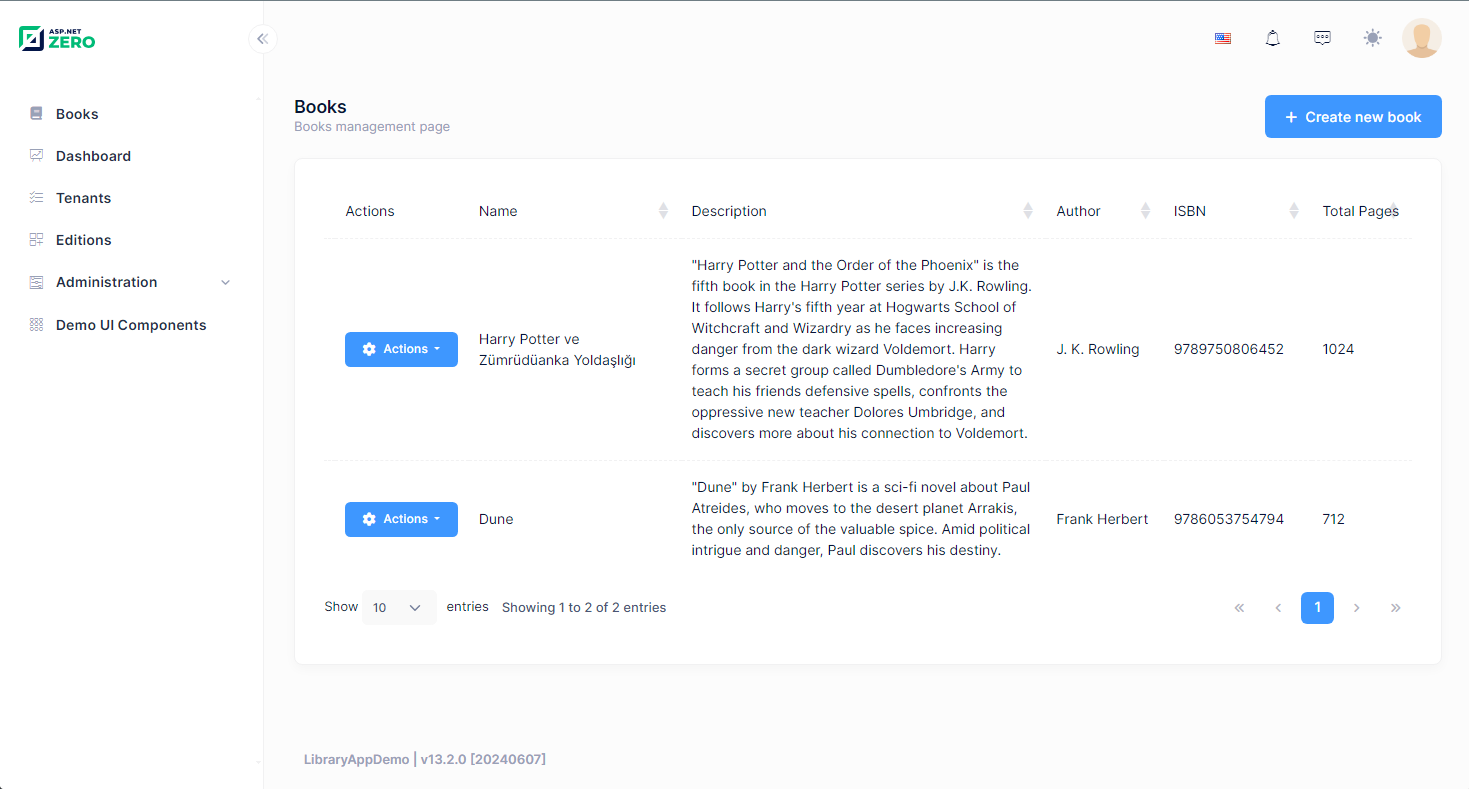
Here is the final product
## Source Code
You can find the source code of the example project on [GitHub](https://github.com/aspnetzero/aspnet-zero-samples/tremastere/master/LibraryAppDemo)
## Conclusion
- In this blog post, we have explored how to build a modular monolith application using ASP.NET Zero. We have created a `BookTracking` module with the `BookTracking.Core`, `BookTracking.Application`, and `BookTracking.Mvc` projects. We have integrated the `BookTracking` module into the main project by adding project references and configuring the modules.
- By following these steps, you can create a modular monolith application with ASP.NET Zero and take advantage of the simplicity and modularity of this architecture.
## See the full documentation
Explore detailed guides, API references, and step-by-step tutorials for ASP.NET Zero.
[Browse documentation](https://aspnetzero.com/documents)
## Have questions before purchasing?
Schedule a free consultation with our team to find the right plan for your project.
[Schedule a meeting](https://aspnetzero.com/schedule-meeting)
## You might also like
### [Business Benefits of Using ASP.NET Zero for Enterprise Software Development](https://aspnetzero.com/blog/business-benefits-of-aspnetzero)
11 September 2026
### [Common Mistakes and Errors When Hosting ASP.NET Core Apps](https://aspnetzero.com/blog/common-mistakes-and-errors-hosting-aspnet-core-apps)
26 August 2026
### [Using AutoMapper After Migrating to Mapperly](https://aspnetzero.com/blog/using-automapper-after-migrating-to-mapperly)
04 August 2026
## Recent posts
### [Business Benefits of Using ASP.NET Zero for Enterprise Software Development](https://aspnetzero.com/blog/business-benefits-of-aspnetzero)
11 September 2026
### [Common Mistakes and Errors When Hosting ASP.NET Core Apps](https://aspnetzero.com/blog/common-mistakes-and-errors-hosting-aspnet-core-apps)
26 August 2026
### [Using AutoMapper After Migrating to Mapperly](https://aspnetzero.com/blog/using-automapper-after-migrating-to-mapperly)
04 August 2026
## Start building with ASP.NET Zero
Full source code, premium support, Angular, React & MVC UI options.
[View pricing](https://aspnetzero.com/pricing)
## Topics