---
title: "DevExpress Reporting (Mvc)"
description: "ASP.NET Zero is the base solution for building robust and scalable web applications. Unlock your full potential today!"
url: "https://aspnetzero.com/blog/devexpress-reporting"
image: "https://aspnetzero.com/Images/Blog/devexpress-reporting.png"
---
[Blog](https://aspnetzero.com/blog)
# DevExpress Reporting (Mvc)
02 March 2022 3 min read [MVC](https://aspnetzero.com/blog/topics/mvc) [Dev Express](https://aspnetzero.com/blog/topics/dev-express) [Reporting](https://aspnetzero.com/blog/topics/reporting)

Share [X](https://twitter.com/intent/tweet?url=https%3A%2F%2Faspnetzero.com%2Fblog%2Fdevexpress-reporting&text=DevExpress+Reporting+%28Mvc%29) [LinkedIn](https://www.linkedin.com/sharing/share-offsite/?url=https%3A%2F%2Faspnetzero.com%2Fblog%2Fdevexpress-reporting) [Reddit](https://reddit.com/submit?url=https%3A%2F%2Faspnetzero.com%2Fblog%2Fdevexpress-reporting&title=DevExpress+Reporting+%28Mvc%29) [Hacker News](https://news.ycombinator.com/submitlink?u=https%3A%2F%2Faspnetzero.com%2Fblog%2Fdevexpress-reporting&t=DevExpress+Reporting+%28Mvc%29)
# DevExpress Reporting in ASP.NET Zero (ASP.NET Core & Mvc version)
ASP.NET Zero, with its modular and extensible architecture, provides a solid foundation for developing robust web applications. By combining the capabilities of **DevExpress Reporting** with ASP.NET Zero, you can effortlessly create and customize visually appealing reports that meet your business requirements.
1. Download [DevExpress Reporting](https://www.devexpress.com/subscriptions/reporting/).
2. Open your ASP.NET Zero project.
3. Import `DevExpress.AspNetCore.Reporting` package to `[YOURAPPNAME].Web.Mvc` project.
4. Then go to `Startup.cs` and add these code parts:
```csharp
public IServiceProvider ConfigureServices(IServiceCollection services)
{
//...
services.AddDevExpressControls(); //add this line
}
public void Configure(IApplicationBuilder app, IWebHostEnvironment env, ILoggerFactory loggerFactory)
{
//...
app.UseDevExpressControls(); //add this line
}
```
5. Now, you can create a sample report to test if it all works. Go to `[YOURAPPNAME].Web.Mvc` and create a folder named `Reports`.
6. Right click on the `Reports` folder then click `Add` -> `New Item`, then select `DevExpress Report` item.
7. Select `Blank` report in the opening wizard, and create new empty report named SampleReport.
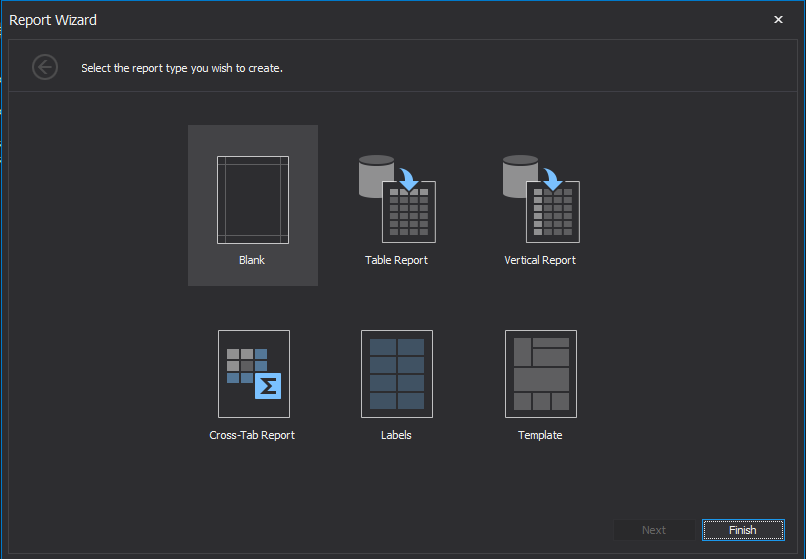
*(Design your report as you wish)*
8. Go to `package.json` and add following dependencies. (It is located in `[YOURAPPNAME].Web.Mvc` project)
```json
dependencies: [
"devextreme": "21.2.*",
"@devexpress/analytics-core": "21.2.*",
"devexpress-reporting": "21.2.*",
"jquery-ui-dist": "^1.12.1"
]
```
*Note: Version of the nuget and npm packages should match*
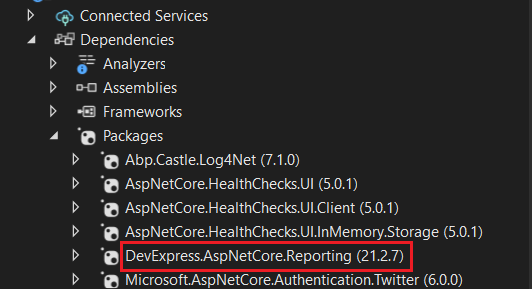
9. Go to `bundles.json` in mvc project and add following bundles.
```json
{
"scripts": [
{
"output": "view-resources/Areas/App/Views/_Bundles/sample-report-min.js",
"input": [
"node_modules/jquery-ui-dist/jquery-ui.js",
"node_modules/knockout/build/output/knockout-latest.js",
"node_modules/devextreme/dist/js/dx.all.js",
"node_modules/@devexpress/analytics-core/dist/js/dx-analytics-core.js",
"node_modules/devexpress-reporting/dist/js/dx-webdocumentviewer.js"
]
}
],
"styles": [
{
"output": "/view-resources/Areas/App/Views/_Bundles/sample-report.min.css",
"input": [
"node_modules/jquery-ui-dist/jquery-ui.css",
"node_modules/devextreme/dist/css/dx.common.css",
"node_modules/devextreme/dist/css/dx.light.css",
"node_modules/@devexpress/analytics-core/dist/css/dx-analytics.common.css",
"node_modules/@devexpress/analytics-core/dist/css/dx-analytics.light.css",
"node_modules/devexpress-reporting/dist/css/dx-webdocumentviewer.css"
]
}
]
}
```
10. Go to `_Layout.cshtml` located in `[YOURAPPNAME].Web.Mvc\Areas\App\Views\Layout\_Layout.cshtml` and add new render section named `HeaderScripts` as nonrequired.
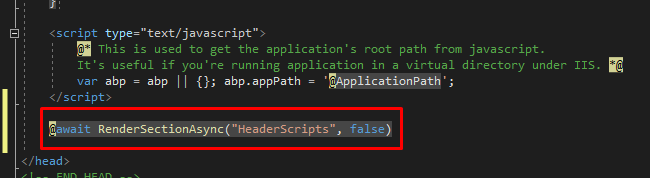
11. Create new controller named `CustomWebDocumentViwerController` for devexpress in MVC project's `Areas/App` folder.
```csharp
public class CustomWebDocumentViewerController : WebDocumentViewerController
{
public CustomWebDocumentViewerController(IWebDocumentViewerMvcControllerService controllerService) : base(controllerService) { }
}
```
12. Create new controller named `SampleReportController` in MVC project's `Areas/App` folder.
```csharp
[Area("App")]
public class SampleReportController : Zerov1002CoreMvcDemoControllerBase
{
public IActionResult Index()
{
return View();
}
}
```
13. Create `Index.cshtml` and add following code into it.
```cshtml
@using DevExpress.AspNetCore
@using Zerov1002CoreMvcDemo.Web.Reports;
@section Styles
{
}
@section HeaderScripts
{
}
```
Your reporting file is ready to use.
- Go to you `[YOURAPPNAME]WebMvcModule` .
- Add following code into `PreInitialize` function
```csharp
public override void PreInitialize()
{
//...
IocManager.Register(typeof(CustomWebDocumentViewerController), DependencyLifeStyle.Transient);
}
```
You can visit `/App/SampleReport` URL under your website to see your report.
## See the full documentation
Explore detailed guides, API references, and step-by-step tutorials for ASP.NET Zero.
[Browse documentation](https://aspnetzero.com/documents)
## Have questions before purchasing?
Schedule a free consultation with our team to find the right plan for your project.
[Schedule a meeting](https://aspnetzero.com/schedule-meeting)
## You might also like
### [Business Benefits of Using ASP.NET Zero for Enterprise Software Development](https://aspnetzero.com/blog/business-benefits-of-aspnetzero)
11 September 2026
### [Common Mistakes and Errors When Hosting ASP.NET Core Apps](https://aspnetzero.com/blog/common-mistakes-and-errors-hosting-aspnet-core-apps)
26 August 2026
### [Using AutoMapper After Migrating to Mapperly](https://aspnetzero.com/blog/using-automapper-after-migrating-to-mapperly)
04 August 2026
## Recent posts
### [Business Benefits of Using ASP.NET Zero for Enterprise Software Development](https://aspnetzero.com/blog/business-benefits-of-aspnetzero)
11 September 2026
### [Common Mistakes and Errors When Hosting ASP.NET Core Apps](https://aspnetzero.com/blog/common-mistakes-and-errors-hosting-aspnet-core-apps)
26 August 2026
### [Using AutoMapper After Migrating to Mapperly](https://aspnetzero.com/blog/using-automapper-after-migrating-to-mapperly)
04 August 2026
## Start building with ASP.NET Zero
Full source code, premium support, Angular, React & MVC UI options.
[View pricing](https://aspnetzero.com/pricing)
## Topics